Flashing Huawei E3372h 4G LTE Stick from HiLink to Modem Mode
Introduction#
This guide shows how to flash a Huawei E3372h LTE stick from its HiLink firmware to the “Stick” (modem) firmware, so it works as a plain modem without NAT. It is for Linux users who want to use the stick with tools such as Gammu or with a router.
The Huawei E3372 is a popular and fairly cheap 4G LTE stick. Its LTE Cat 4 modem supports up to 150 Mbit/s download and 50 Mbit/s upload. When needed, it falls back to (DC-)HSPA(+), UMTS and EDGE. It is also small: 88 mm × 28 mm × 11.5 mm.
As usual, there is a footgun when you buy an E3372 for a particular use:
- E3372h-xxx are shipped with “HiLink” firmware (version 22.x or newer).
The LTE-stick appears as an Ethernet device, with own DHCP server, and runs a web portal on
192.168.8.1for configuration and stats. This includes the fact that it’s “NATting” for you and has a built-in firewall, which is not configurable at all. - E3372s-xxx are shipped with a so called “Stick” firmware (version 21.x). The LTE-stick appears as two USB serial devices. One of them has an AT-interface that can use both PPP (slow) and NCM (faster). In this mode, the created interface displays the IP address assigned by the mobile network directly without NAT.
You want your E3372 in Stick or modem mode if you plan to use it with Gammu or connect it to a MikroTik router.
WARNING: Don’t buy the E3372h-320 for flashing, it’s not possible to replace the firmware on this new hardware revision anymore!

Flashing the modem firmware#
First, get the flashing software. You can either clone the two repositories and compile them with
make, or download pre-compiled Linux binaries.Pre-compiled packages:
To compile the software yourself:
Install the build dependencies:
sudo dnf install -y gcc zlib-develbalong-usbload is an emergency USB boot loader utility for Huawei LTE modems and routers with Balong V2R7, V7R11 and V7R22 chipsets. It loads an external boot loader or firmware update tool (
usbloader.bin) through the emergency serial port, which is available when the firmware is corrupted or the boot pin (test point) is shorted to ground.git clone https://git.zaage.it/robert/balong-usbload.git cd balong-usbload makebalong-flash flashes BIN and EXE firmware files to the device in download mode. It can also flash separate firmware components from a directory.
git clone https://git.zaage.it/robert/balong-flash.git
cd balong-flash
make
Open the stick with a knife and use the “needle method” shown below to put it into flash mode.
This is what the stick looks like disassembled:
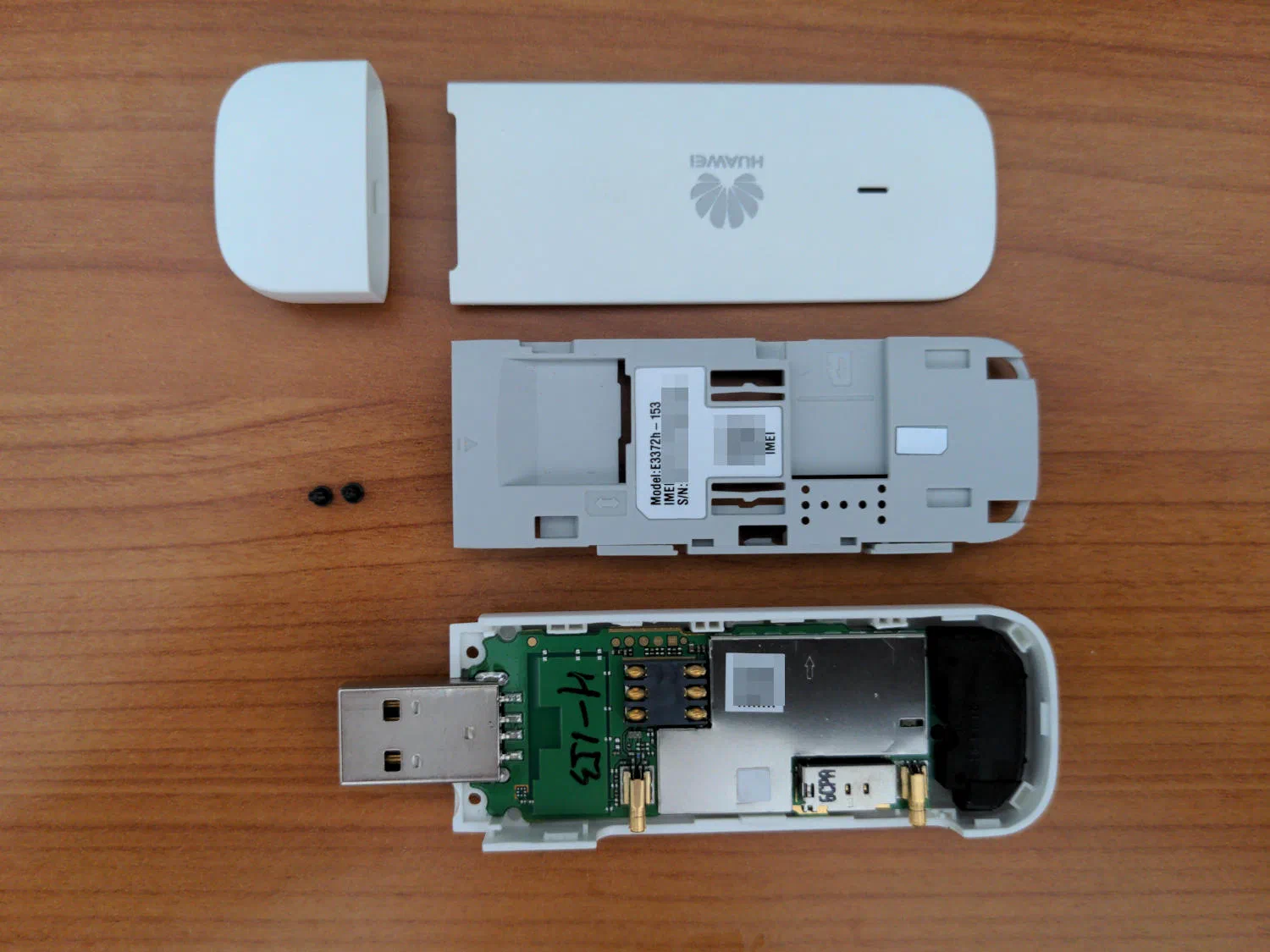
Disassembled E3372h-153 stick 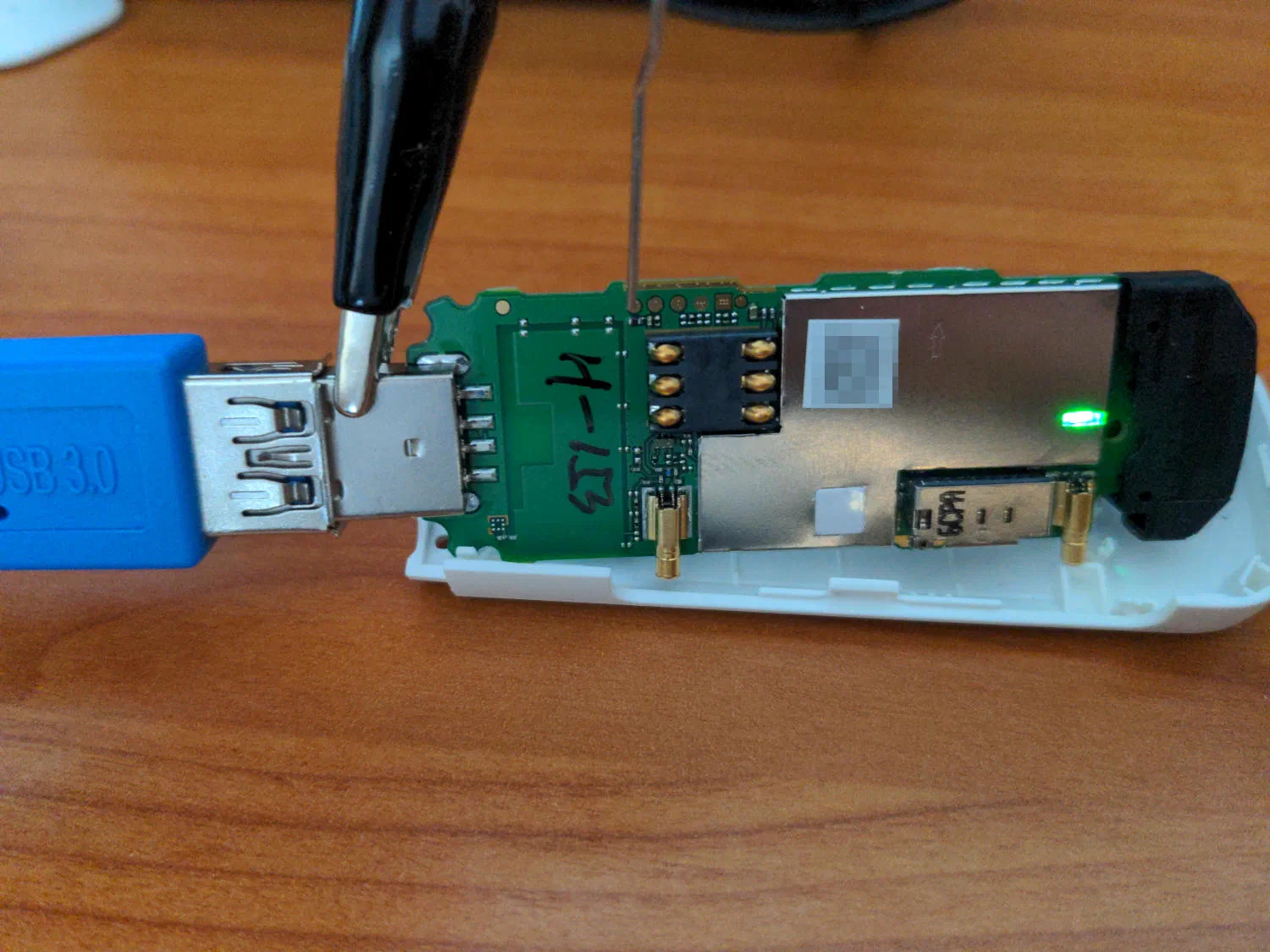
Using the needle method for flashing The needle shorts a test point on the circuit board to ground while you plug the stick into the USB port. Watch
dmesgor the system log for a newly detected USB serial port.Then use balong-usbload to put the stick into a temporary download mode. The balong utilities must run as root.
usblsafe-3372h.binis in the balong-usbload repository:sudo ./balong-usbload -p /dev/ttyUSB0 usblsafe-3372h.binUse the right
ttyUSBXdevice:ls /dev/ttyUSB*ordmesgshows it, and on your system it could also bettyUSB1orttyUSB2.The stick’s LED should now blink, and you can flash the firmware with balong-flash:
sudo ./balong-flash -p /dev/ttyUSB2 E3372h-153_UPDATE_21.180.01.00.00.BINThe
ttyUSBXdevice may have changed since the previous step.You can find other firmware versions online, but here is one that worked for me:


Result#
The E3372h now runs the Stick firmware 21.180.01.00.00 and behaves like a non-HiLink E3372s: it shows up as a modem with serial interfaces instead of a NATting Ethernet device.
Sources#
- balong-usbload: https://git.zaage.it/robert/balong-usbload
- balong-flash: https://git.zaage.it/robert/balong-flash
- Gammu: https://gammu.org/